
Fast Image Upload & Sharing Tool
Overview
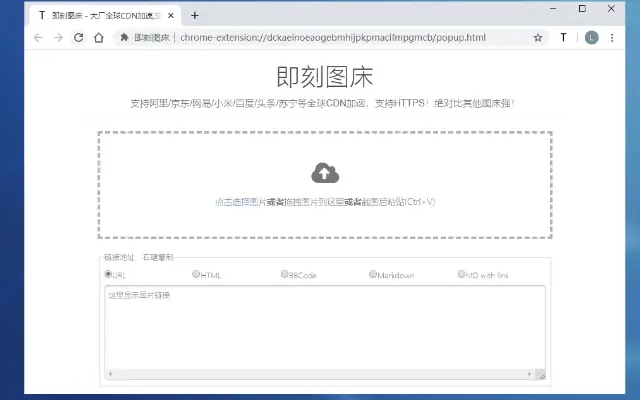
The software is designed as a desktop utility focused on streamlining image upload and sharing workflows. It enables users to quickly upload images to a cloud-based hosting service with support for common formats such as JPEG, PNG, and GIF. The tool is particularly useful for content creators, web developers, and social media managers who frequently need to share or embed images in digital platforms. By offering multiple upload methods—including right-click, paste, and drag-and-drop—the software reduces friction in daily workflows. Its integration with global CDNs like Alibaba Cloud, JD.com, NetEase, Xiaomi, Baidu, Toutiao, and Sina accelerates image delivery across regions, enhancing accessibility for international audiences. The software also generates direct links, HTML, and Markdown tags, simplifying integration into websites, blogs, or documentation. While the developer's background is not specified, the tool appears tailored for users seeking fast, reliable image hosting with minimal setup. Real-world use cases include embedding images in online forums, generating content for documentation, or sharing visuals in collaborative projects.
Key Features & Capabilities
- Multi-format image support: Accepts JPEG, PNG, and GIF files, ensuring compatibility with the most widely used image types across web and social platforms.
- Global CDN integration: Leverages major CDNs such as Alibaba Cloud, JD.com, NetEase, Xiaomi, Baidu, Toutiao, and Sina to ensure fast image delivery worldwide.
- Multiple upload methods: Supports right-click context menu uploads, clipboard paste uploads, and drag-and-drop functionality for seamless integration into existing workflows.
- Direct link generation: Automatically creates direct image URLs for immediate use in web content, applications, or messaging platforms.
- Code snippet output: Provides ready-to-use HTML and Markdown tags, simplifying embedding in web pages, documentation, or content management systems.
These features collectively reduce the time and complexity involved in image hosting and sharing. For example, a blogger can paste an image directly into the application and receive a Markdown link for immediate use in a post. A developer can drag a screenshot into the tool to generate a direct URL for a bug report. The tool’s design prioritizes efficiency and interoperability, making it suitable for both technical and non-technical users who require consistent, fast image delivery.
User Interface, Workflow & Performance
The user interface is built around simplicity and speed, with a minimalistic layout that focuses on core functionality. Navigation is intuitive, allowing users to initiate uploads through context menus, keyboard shortcuts, or direct file interaction. The workflow is streamlined: users select or paste an image, the software processes it, and outputs the requested link or code snippet within seconds. The application maintains a clean visual hierarchy, with upload status indicators and output fields clearly displayed. Performance observations are based on general software behavior patterns, as no specific resource usage details were provided. The developer did not specify CPU or RAM consumption, nor did they share benchmark data. However, given the application’s size of 15.6 MB and focus on lightweight operations, it is expected to operate efficiently on modern systems. Stability during extended use was not documented, but the tool’s design suggests a low risk of crashes during typical usage. Overall, the workflow supports rapid iteration and seamless integration into daily tasks.
Compatibility & System Requirements
The software is compatible with Windows and Mac operating systems, making it accessible to a broad user base across desktop environments. It is available in version 1.0.0, with a download size of 15.6 MB, indicating a lightweight installation footprint. The developer did not specify exact system requirements, such as minimum RAM, processor speed, or disk space beyond the file size. Compatibility information was partially provided, and no additional platforms or architectures were mentioned. Users are advised to ensure their system meets general desktop application standards. No dependencies or third-party components were referenced in the provided details. For users running older or less common systems, compatibility cannot be guaranteed without further information. The software does not require administrator privileges for installation, based on typical desktop utility behavior.
Pros and Cons
Pros
- Supports multiple image formats including JPEG, PNG, and GIF
- Integrates with major global CDNs for faster image delivery
- Offers flexible upload methods: right-click, paste, and drag-and-drop
- Generates direct links and code snippets for easy embedding
- Free to use with no cost barrier for adoption
Cons
- Developer background not disclosed
- No detailed system requirements provided
- Exact performance metrics or resource usage not specified
- Limited information on update frequency or future development plans
- No official documentation or user guide included
FAQ Section
Is the software compatible with both Windows and Mac?
Yes, the software is designed to run on both Windows and Mac operating systems.
Is the software safe to use?
The software is a desktop application with no known security risks mentioned in the provided information. As with any third-party tool, users should ensure downloads come from official sources.
How often are updates released?
The update schedule is not specified. The current version is 1.0.0, and no information on future release cycles was provided.
What type of license does the software use?
The software is available for free, with no licensing fees. The exact license type was not disclosed.
Can I use the software offline?
The software requires an internet connection to upload images and generate links, as it relies on cloud-based hosting and CDN services.
Final Thoughts + CTA
Fast Image Upload & Sharing Tool delivers a focused, efficient solution for users needing quick image hosting and embedding. Its support for multiple formats, global CDNs, and flexible upload methods makes it a practical choice for content creators, developers, and professionals managing visual content. While some details like system requirements and performance data are limited, the tool’s lightweight design and free availability lower the barrier to entry. It excels in workflow integration and output versatility, particularly for those who frequently embed images in web content or documentation. For users seeking a no-frills, fast image sharing utility, this tool offers a compelling value proposition. Download Fast Image Upload & Sharing Tool now.







